Simplified Overview (ELI5)
Written by Abrar Akhunji
Imagine turning your terminal into a virtual company with seven specialized departments.
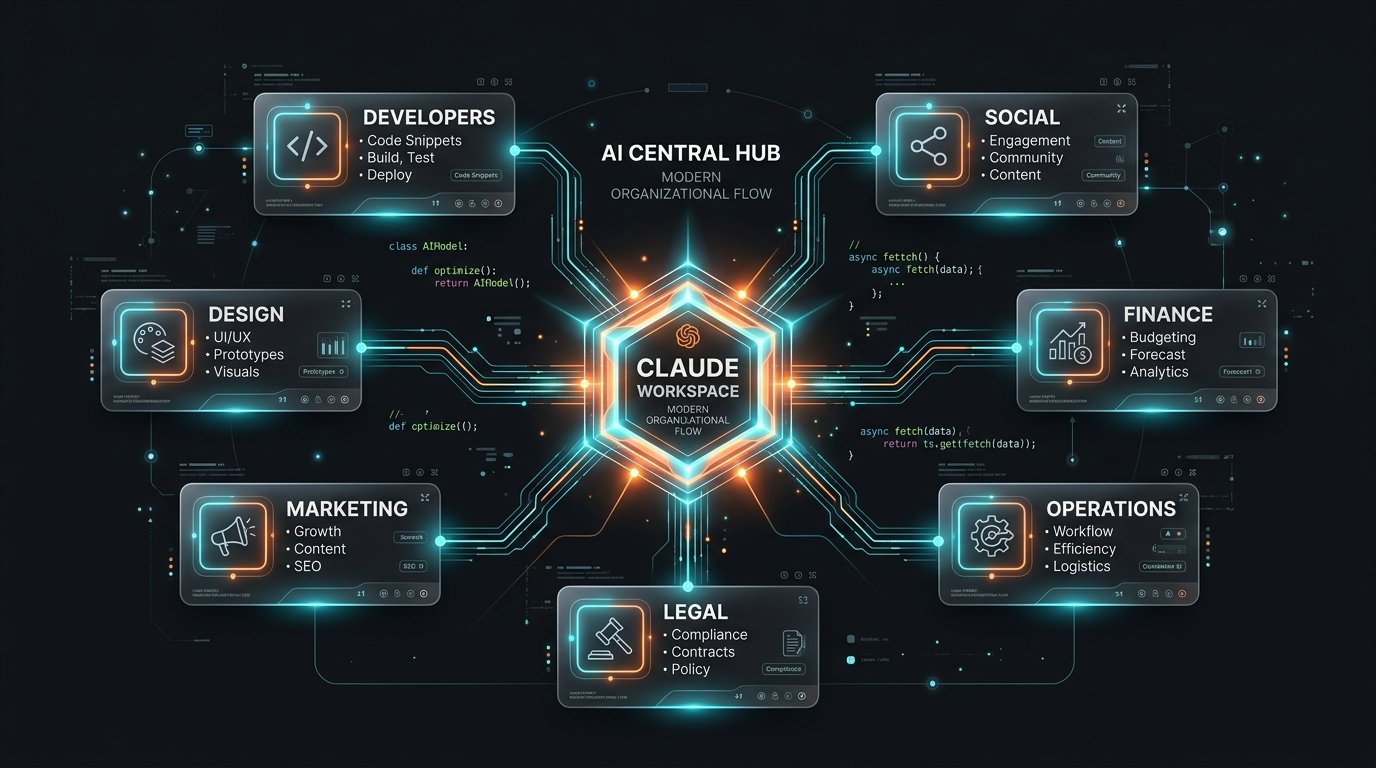
Recently, tech creator @leadgenman published a viral breakdown titled "Your Claude Workforce", organizing 42 real Claude Code skills into a company org-chart across seven teams: Dev, Design, Marketing, Social & Content, Finance, Operations, and Legal.
While this org chart is a community framework rather than an official Anthropic product feature, it is a brilliant mental model for how Claude Code has grown beyond simple code completion.
Here is a complete breakdown of all 42 skills, how the SKILL.md plugin architecture works, and how to build your AI workforce like a senior engineer without cluttering your workspace.
Senior Developer Systems Breakdown
Written by Abrar Akhunji
On social media, creator @leadgenman released "Your Claude Workforce"—a curated architectural framework mapping 42 real Claude Code skills across seven functional departments: Developers, Design, Marketing, Social & Content, Finance, Operations, and Legal.
It is important to clarify upfront: this is a community curation, not an official Anthropic release. However, many of the listed tools (such as Jesse Vincent’s Superpowers and Upstash’s Context7) are widely adopted, open-source projects in the active Claude ecosystem.
Evaluating this 42-skill map reveals how extensible the CLI environment has become. Below is a deep-dive breakdown of the full 7-department stack, how the underlying SKILL.md format functions, security considerations for third-party MCP servers, and strategic recommendations for plugin management.
The Virtual Company Org Chart (42 Skills / 7 Departments)
- Developers: Superpowers, Context7, MCP Builder, Skill Creator, Webapp Testing, Claude-Mem.
- Design Studio: frontend-design, web-artifacts, canvas-design, algorithmic-art, ui-ux-pro-max, slack-gif.
- Growth & Marketing: seo-audit, programmatic-seo, ai-seo, cro, ad-creative, mktg-psychology.
- Social & Content: social, copywriting, content-strategy, video, pillar-content, email-sequences.
- Finance (CFO Desk): dcf-model, 3-statements, lbo-model, comps-analysis, pricing, pitch-deck.
- Operations Backbone: sop-builder, incident-postmortem, business-case, launch-runbook, internal-comms, xlsx.
- Legal Desk: contract-review, nda-triage, legal-risk, compliance, docx, sql-queries.
Simplified Overview (ELI5)
What Are Claude Code Skills, Actually?
Before diving into the departments, how do skills actually work in Claude Code?
At the core of every skill is an open format called SKILL.md. It is a structured Markdown file containing instructions, workflows, and rules. When you install a skill into Claude Code, you don't even have to type a special command every time—Claude automatically reads the file and activates those instructions whenever you ask a relevant question.
You can install skills through Claude Code's built-in plugin marketplace or via CLI commands:
# Adding a plugin marketplace source
/plugin marketplace add <repository-url>

# Installing a skill by name
/plugin install <skill-name>
⚠️ Safety Tip: Anthropic's plugin marketplace documentation explicitly notes that third-party plugins and MCP servers are not independently audited by Anthropic. Always check the plugin's source repository before installing it.
Senior Developer Systems Breakdown
What Are Claude Code Skills, Actually?
Architecturally, a Claude Code skill relies on the open SKILL.md specification—a standardized markdown metadata structure defined with YAML frontmatter and instructional system prompts.
When placed in a workspace or installed globally, Claude inspects the active skill manifest during session initialization. When a user prompt matches a skill's declared domain or trigger pattern, Claude contextually loads the instructional block into its reasoning loop without requiring manual invocation flags.
---
name: example-skill
description: Automatic workflow trigger for spec validation
---
# Skill Instructions
1. Inspect project root for config files...
2. Run test assertions before generating output...
Plugins are typically distributed via git repositories or package registries (npx skills add <name>) and managed within the CLI via /plugin commands.
🔒 Marketplace Security & Trust Boundary: As stated in Anthropic's official marketplace documentation, Anthropic does not review, sandbox, or verify third-party plugin source code or bundled MCP (Model Context Protocol) binaries. Because MCP servers can execute arbitrary local shell commands or network requests, developers should audit all third-party
SKILL.mdmanifests and associated server implementations prior to deployment.
Department 01/07: Developers
"Ship code faster, from scaffold to QA."
Created by Jesse Vincent ("obra"), this MIT-licensed agentic skill pack enforces test-driven development (TDD), systematic debugging, and git worktree isolation. Includes a meta-skill that prevents Claude from cutting corners.
Built by Upstash, this MCP server fetches live, version-exact documentation directly from source repositories into Claude's context window, eliminating hallucinations of deprecated APIs.
Guides the scaffolding and protocol implementation for building custom Model Context Protocol (MCP) servers to connect Claude to proprietary internal APIs.
Automates the creation of new SKILL.md manifests by observing your repeating workflow steps and packaging them into reusable skill modules.
Orchestrates automated headless browser testing (via Playwright or Puppeteer) to verify UI components, form validations, and user navigation flows.
Maintains persistent cross-session memory logs, storing architectural decisions, codebase quirks, and environment configurations across CLI restarts.
Department 02/07: Design
"UI that never looks templated."
Generates production-grade React components using modern Tailwind CSS patterns, glassmorphic styling, and micro-animations instead of basic generic HTML.
Creates self-contained interactive web artifacts powered by shadcn/ui and Radix primitives for quick UI visual prototyping.
Renders clean vector visual art, marketing banners, and structured layout graphics, exporting directly to high-resolution PNG or PDF formats.
Generates mathematical and generative visual art scripts using p5.js and HTML5 Canvas for dynamic canvas backgrounds.
Provides full design-system audit rules, checking color contrast (WCAG AA/AAA compliance), typography scales, and responsive layout grids.
Compiles frame-by-frame canvas animations into Slack-ready custom GIFs for feature announcements and team celebrations.
Department 03/07: Marketing
"Copy, SEO and ads that convert."
Scans HTML documents and React components to identify technical SEO flaws, missing Open Graph tags, heading hierarchy gaps, and image alt attributes.
Generates data-driven landing page templates at scale, mapping CSV/JSON datasets into search-engine-indexed static pages.
Structures website content, direct answer summaries, and schema markup to maximize visibility inside AI search engines like Perplexity and SearchGPT.
Analyzes landing page layouts and hero copy against proven Conversion Rate Optimization (CRO) heuristic frameworks to increase sign-up conversion.
Generates multi-platform ad copy variations (Meta, Google Search, LinkedIn) tailored to different audience segments and pain points.
Applies behavioral economics triggers (loss aversion, social proof, scarcity, anchoring) to product positioning and sales copy.
Department 04/07: Social & Content
"Feed the algorithm on autopilot."
Repurposes long-form blog posts and technical updates into formatted X/Twitter threads, LinkedIn posts, and short social carousels.
Refines existing product descriptions and marketing copy to remove corporate jargon, improve clarity, and heighten emotional impact.
Maps out multi-week editorial content calendars, keyword target clusters, and publication schedules for tech blogs.
Drafts video scripts, spoken audio hooks, screen-recording storyboards, and YouTube descriptions for product launches.
Structures comprehensive ultimate guides and links supporting sub-topic articles into cohesive hub-and-spoke content networks.
Authors multi-stage email onboarding sequences, product update newsletters, and automated churn-recovery drip campaigns.
Department 05/07: Finance
"Model the numbers before you spend."
Builds Discounted Cash Flow valuation models with terminal value calculations, WACC assumptions, and sensitivity analysis tables.
Constructs dynamically linked Income Statement, Balance Sheet, and Cash Flow financial models for financial forecasting.
Calculates Leveraged Buyout debt capacity, interest schedules, internal rate of return (IRR), and exit equity multiples.
Assembles public comparable company metrics (EV/EBITDA, P/E, EV/Revenue) to establish valuation benchmarks.
Models SaaS pricing tiers, freemium conversion boundaries, usage-based unit economics, and expansion revenue levers.
Structures seed and Series A investor pitch slide outlines, financial summaries, TAM calculations, and competitive landscapes.
Department 06/07: Operations
"Run the business like a machine."
Transforms informal team processes into standardized operational procedure documents (SOPs) with clear role assignments and checklists.
Drafts blameless incident post-mortems following production outages, mapping root cause analysis and action item tracking.
Authors formal ROI proposals, cost-benefit analyses, and resource allocation business cases for internal executive sign-off.
Outlines chronological deployment checklists, DNS cutover steps, database migration procedures, and rollback triggers.
Drafts company updates, executive memos, internal Q&A documents, and engineering sprint summaries.
Generates, updates, and formats native Microsoft Excel spreadsheets containing dynamic formulas and data validation tables.
Department 07/07: Legal
"Read the fine print for you."
Performs line-by-line risk assessments on vendor and customer service agreements, flagging unusual indemnification clauses.
Automatically triages standard Mutual Non-Disclosure Agreements against company playbook standards to highlight non-standard terms.
Evaluates new feature proposals against intellectual property risk, liability exposure, and terms-of-service compliance.
Checks data architecture plans against regulatory frameworks including GDPR, CCPA, SOC2, and HIPAA privacy rules.
Generates and edits Microsoft Word documents with native tracked changes, comments, and structured legal styling.
Writes precise SQL queries to extract user data audit logs and database records required for legal discovery requests.
Recommended Installation Strategy (Don't Hoard Skills)
- Core Workspace Extensions: Keep active skills you use every single day. For developers: Superpowers + Context7 + Webapp Testing.
- Invoke Per Project: Run Marketing, Legal, or Finance skills only when actively performing those tasks. Don't leave them globally active.
- Clean Up Clutter: Audit installed skills monthly. Remove unused plugins to prevent prompt context bloating and instruction drift.
Simplified Overview (ELI5)
How to Use This Like a Senior Developer
Seeing 42 shiny skills makes it tempting to install all of them at once. Don't do it.
Here is why: every skill you install adds instructions to Claude's memory on every single turn. If you install 42 skills, Claude has to process hundreds of extra rules before answering even a simple question. This causes "instruction drift"—where Claude gets confused by conflicting rules—and wastes your token budget.
Instead, follow this simple 3-tier strategy:
- Always-On Daily Drivers: Install 3 to 5 core tools for your primary job (e.g., Superpowers and Context7 for developers).
- On-Demand Task Tools: Run skills for other departments (like contract-review or dcf-model) only when you are actively working on a specific document.
- Monthly Audit: Uninstall skills you haven't used in 30 days, just like you would clean up unused software dependencies.
Senior Developer Systems Breakdown
Strategic Plugin Management: Avoiding Instruction Drift
While @leadgenman's 7-department curation provides an impressive taxonomy, installing all 42 skills simultaneously is anti-pattern in production CLI environments.
The Cost of Skill Over-Provisioning
- Context Window Contention: System prompts and instructions defined in active
SKILL.mdmanifests are evaluated during session reasoning. Loading dozens of unneeded skills consumes valuable token overhead. - Instruction Drift & Rule Collisions: Overlapping guidelines (e.g., a marketing copy skill colliding with a strict legal review skill) can degrade Claude's execution precision.
- Security Surface Area: Every active MCP plugin represents an unmanaged external dependency.
The 3-Tier Deployment Protocol
- Tier 1 (Global System Skills): Keep 3–5 core engineering skills installed globally (e.g., Superpowers, Context7, frontend-design).
- Tier 2 (Project-Local Manifests): Store specialized domain skills inside your target repository's
.claude/skills/directory so they only activate when working in that project. - Tier 3 (Transient Execution): Invoke single-use tools (such as dcf-model or nda-triage) on demand, then purge them from the workspace configuration once the artifact is delivered.
Simplified Overview (ELI5)
Frequently Asked Questions
- What is a Claude Code skill? It is a packaged extension using an open
SKILL.mdformat that gives Claude specific instructions and tools for specialized tasks. - Are these official Anthropic skills? No. This 42-skill list comes from a community curation by @leadgenman. Some skills correspond to Anthropic reference categories, while others are open-source community projects.
- Do I need to install all 42 skills? No. You should only install 3 to 5 core skills that map to your daily workflow.
- Is it safe to install third-party plugins? Generally yes for popular tools like Superpowers or Context7, but you should always inspect third-party plugin repositories before installing.
Senior Developer Systems Breakdown
FAQ
- What is a Claude Code skill? A skill is a workspace extension built around a standardized
SKILL.mdfile. It exposes structured instructions, API workflows, and MCP server tools to Claude Code. - Are these 42 skills officially created by Anthropic? No. This 7-department org chart was curated by creator @leadgenman. It maps out real open-source tools across the broader Claude ecosystem.
- Does installing skills increase API token costs? Yes. Active skill instructions are included in the session context, slightly increasing input token consumption per turn.
- Where can I browse or search for skills? You can discover skills via the official Claude Code plugin marketplace (
/plugin marketplace add) or by browsing the Anthropic community skill directories.
Simplified Overview (ELI5)
The Verdict
The real value of @leadgenman's 7-department org chart isn't just the catchy visual—it is realizing how far Claude Code has expanded beyond basic code completion.
Whether you are using OpenCode Desktop for agentic coding, controlling tech debt with Ponytail, or testing models like Gemini 3.6 Flash and Claude Opus 5, mastering skill curation is the key to running a lean, powerful AI workflow.
Check out the original carousel by @leadgenman on social media, explore the Superpowers repo, and start curating your own custom team today.
Senior Developer Systems Breakdown
The Verdict
The 7-department "Claude Workforce" curation highlights the rapid maturity of the Claude Code ecosystem. By combining modular SKILL.md definitions with MCP server integrations, developers can extend their terminal into a full-stack execution hub.
However, disciplined plugin management is critical. Treat skills as targeted dependencies: pin trusted versions, audit third-party code, and keep your global context lean.
For related agentic workflows, explore our deep-dives on OpenCode Desktop, Ponytail, and Claude Opus 5. Follow creator @leadgenman for ongoing workforce updates.